Loopsmith: Game-ready seamless loops
A downloadable tool for Windows

Make your game music loop forever, then layer it, switch it, and ship it.
Try it free first: the demo at the bottom of this page is the full app with 5 free exports. No account, no signup.
Loopsmith is a Windows application for composers, sound designers, and indie game developers. It makes your music repeat seamlessly, builds adaptive music that responds to the game, and gets it into your engine: one click builds the whole music setup inside FMOD Studio, Wwise, or Unreal with no middleware at all, and for Unity, Godot and the Web it writes the drop-in code, so you paste a ready-made snippet and call one line instead of writing the looping code yourself. A full batch converter is built in too.
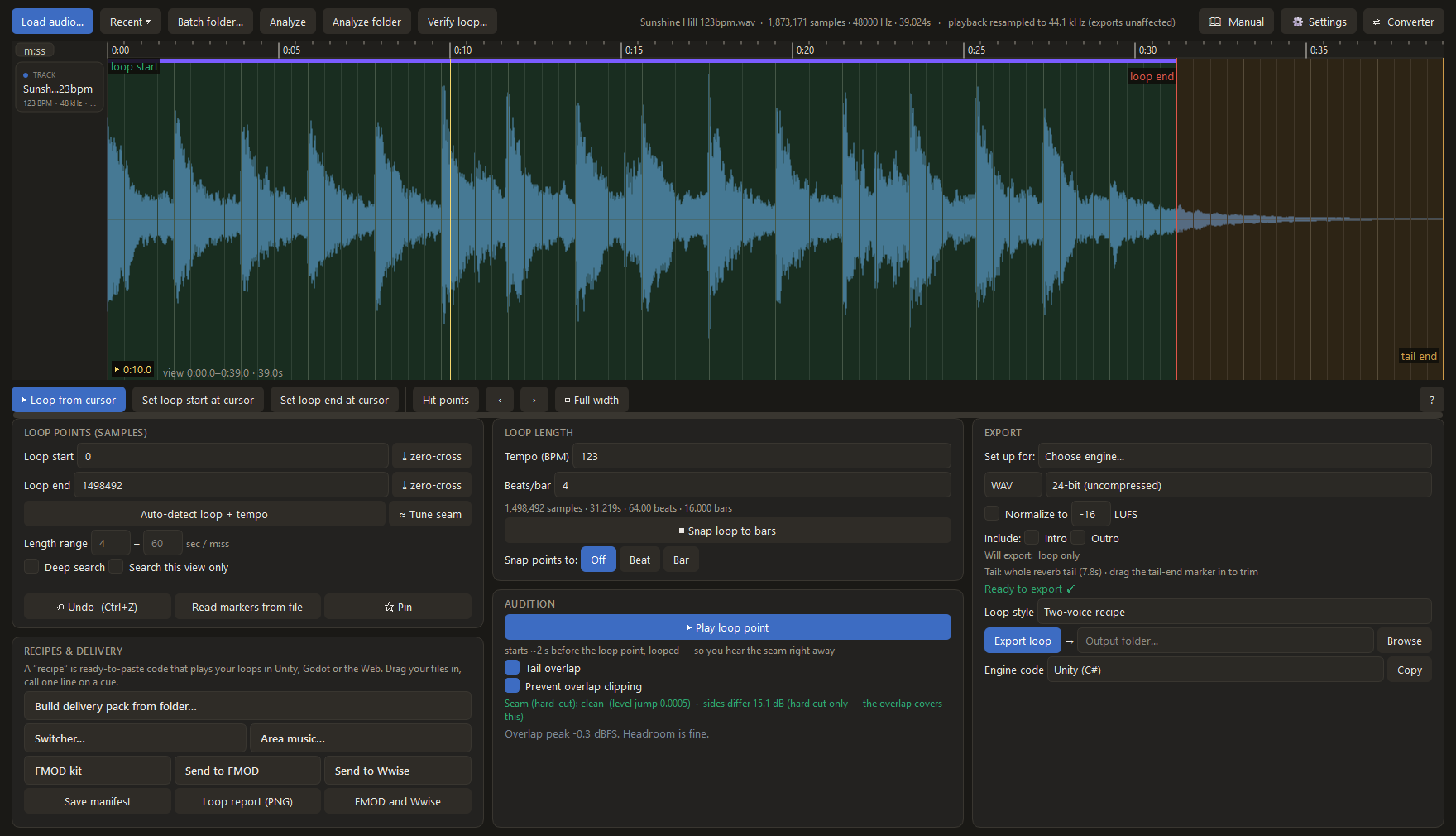
Seamless loops. Game audio has to repeat with no gap and no click. Loopsmith uses the tail-overlap technique that pro game audio relies on: render your master with the reverb still ringing past the loop point, and Loopsmith carries that ring over the fresh start, so the room never falls silent. Set the loop by ear, let auto-detect find it, or snap it to exact bars and beats from the tempo. The bar grid counts from the start of the file, so a render that begins on the downbeat snaps straight onto it. Hear the precise seam before you commit, and a live seam check tells you instantly whether a hard cut would click. You can also open any finished file to confirm its loop survived, so you can prove a delivered file loops before you hand it to a client.
Adaptive music, built as files before it ever reaches the engine:
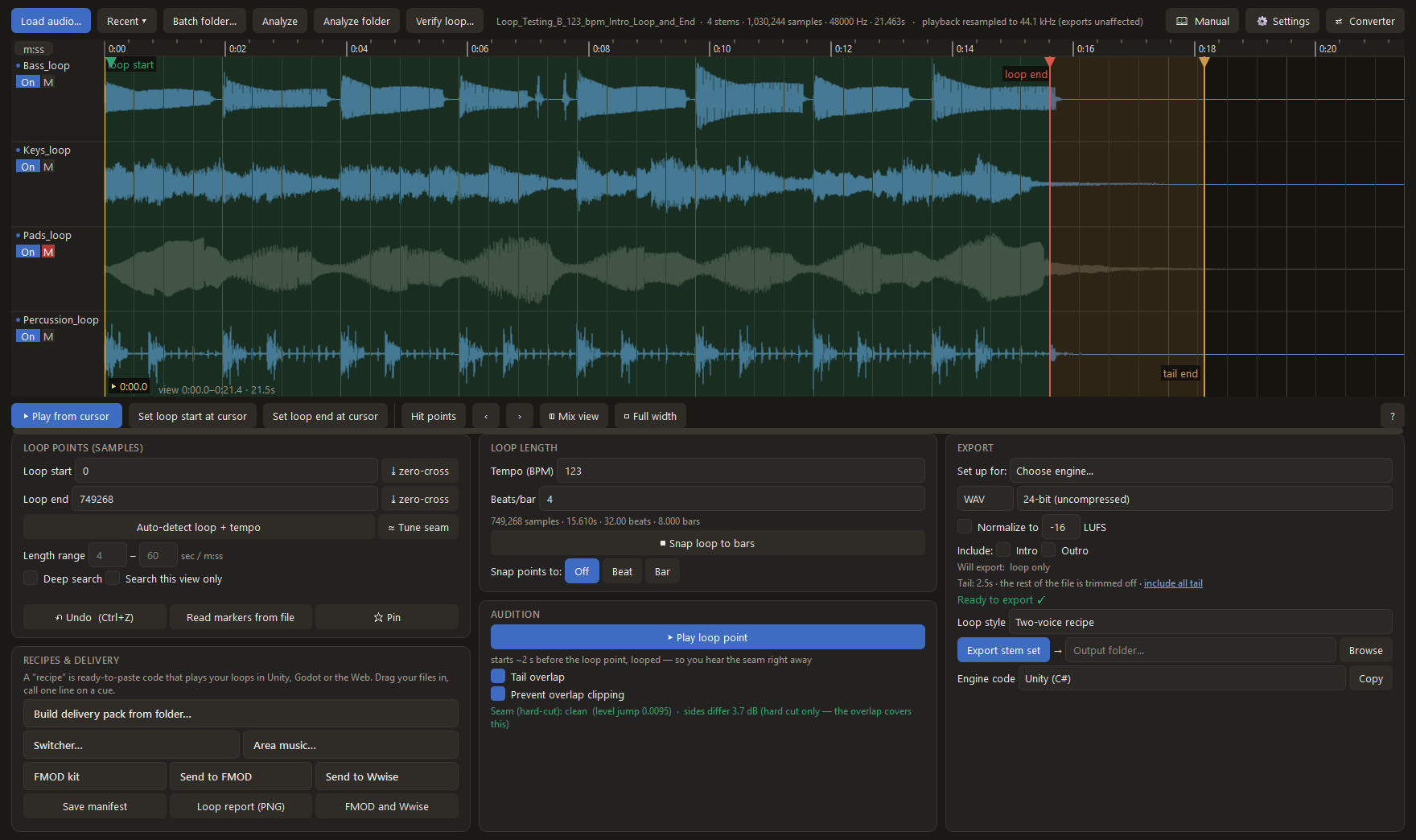
- Vertical layering (stems): stack your stems and set which ones start. The game fades layers in and out for intensity (drums and bass while exploring, the lead drops in for combat).
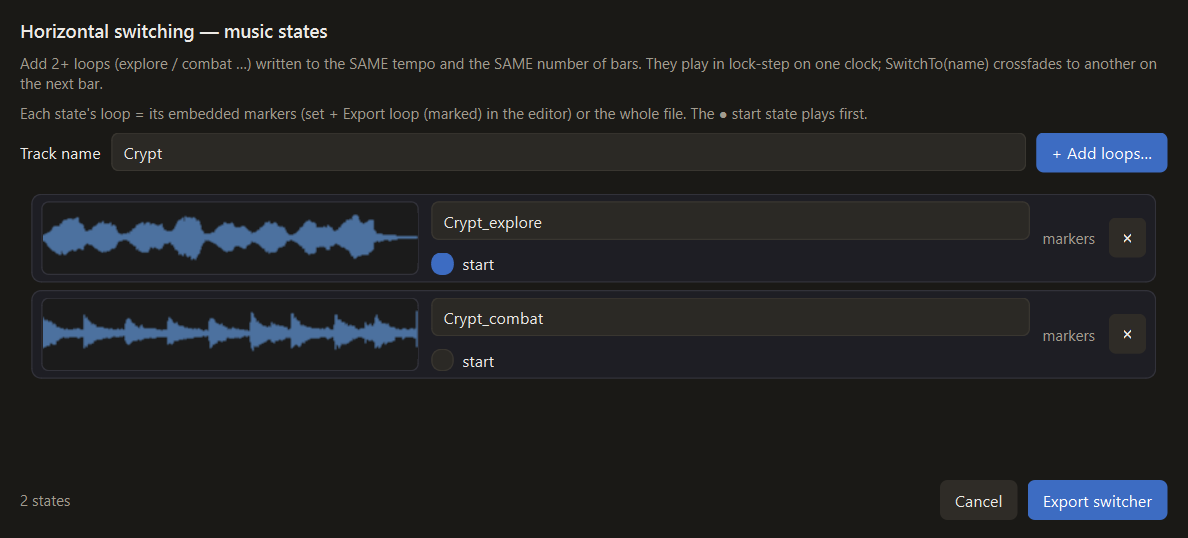
- Switch and crossfade whole tracks on a cue: area to area (forest to town to cave) or state to state (explore to combat), and back. Beat-matched when the tracks share a tempo and a loop length (same bar count, same sample rate), a smooth crossfade when they don't, with no gap or click at the change.
- Stop on a cue: one line fades the music out when the game needs silence for a pause menu, a cutscene, or a death screen; in Unity and Godot you can set the fade length or cut it instantly.
- Stingers that land on the beat: fire a one-shot accent, an item pickup, a discovery sting, and when your loop is a whole number of bars it lands exactly on the music’s next bar or beat, through the intro and the ending too. Built into every adaptive target: FMOD, Wwise, Unreal, and the Unity, Godot and Web recipes.
- In-window stem editor: load your stems as stacked lanes, set the opening mix per lane, and use hit-point detection to land the loop right on a transient. Each set exports with a one-line snippet for Unity, Godot, and Web Audio.
Watch adaptive stems in action:
Hear it before it's in the game. Every adaptive set ships with a browser test page. Drop your tracks in and audition the layering or the crossfade right in the browser, no game engine required.
Exports for every engine. One click writes the loop into the file as markers that Godot and RPG Maker read natively (the WAV smpl chunk for Godot, LOOPSTART/LOOPLENGTH tags in OGG for RPG Maker; Loopsmith marks WAV, FLAC, OGG and Opus, and the manual says which format each engine actually reads), and builds the looping event or music hierarchy for you right inside FMOD Studio and Wwise (see below), with the exact loop points always available if you prefer to place them by hand. Or export a sample-accurate intro / loop / outro split with ready-made Unity (C#), Godot (GDScript), and Web Audio (JS) snippets. It can also fold the reverb tail into a single flat file, so the loop stays seamless in one-voice engines that just play the file and loop it, like RPG Maker and GameMaker. Every pass after the first is exact; the first pass from a cold start carries a little extra tail, which an intro covers. Point Build delivery pack at a folder of finished loops and it writes a data sheet plus engine code for the whole set. The bundled manual has step-by-step setup for Unity, Godot and Web, plus a kit-first Unreal walkthrough and per-engine guidance for FMOD, Wwise, RPG Maker and GameMaker.
New in 1.7: one click builds your music in Unreal, no middleware required. Press Unreal kit and Loopsmith writes your audio plus a generated editor Python script. Run it once in Unreal (Tools, Execute Python Script) and a complete MetaSound music system appears in your project: the seamless two-voice loop with the previous pass’s tail ringing over every restart, your intro played once ahead of it, a mix control per stem, a game-controlled musical ending, and a stinger input. From game code it is one call each: SetTriggerParameter("End"), SetTriggerParameter("Stinger"), SetFloatParameter("<Stem> Gain", 0..1). Unreal ignores embedded loop points entirely, so the grid rides cue markers Loopsmith bakes into the file instead, which Unreal does honor, sample accurately. Stingers landed everywhere in 1.7 too: FMOD, Wwise and Unreal all build them in now, alongside the Unity, Godot and Web recipes that already had them.
New in 1.6: one click builds your FMOD event or Wwise music hierarchy. With FMOD Studio open (2.02 or newer), Send to FMOD assembles the looping event live. One-time FMOD setup: Edit, Preferences, Interface, tick Enable Script Server, then restart FMOD Studio. It builds the loop region, the reverb tail ringing over every restart from the transition timeline, and an End parameter your game sets to let the music finish with its own real ending. With Wwise open (2023.1 or newer), Send to Wwise builds the Interactive Music setup: Entry and Exit cues at your exact loop samples, the tail ringing over each restart, plus an intro segment and a state-driven composed ending when you’ve marked them. Both sends need the reverb decay rendered past the loop point, since that decay is what rings over the restart; a dry loop that stops at the loop point uses the normal loop export instead. Load a stem set and both scale up: one track per stem, sample-locked, ending together. Prefer offline? FMOD kit writes the same event as a script that runs from FMOD’s Scripts menu. Hand a teammate the whole kit folder, script plus WAVs, since the script points at the audio by its exported location.
Watch one click build a looping event in FMOD and a music hierarchy in Wwise:
Don't FMOD, Wwise, or my engine already handle this? Partly, yes, and it's worth being straight about. Wwise and FMOD are full authoring tools: you can place loop cues on a timeline, type in a tempo grid, quantize transitions to it, and audition the result without running the game. Wwise will even play a baked reverb tail across the loop seam. What neither one does is prepare the audio itself: no tempo detection, no finding the seam, no folding the tail across the loop point for you. To be fair, no tool conjures a tail from nothing, this one included: you render your track letting the reverb ring out past the loop end, as you normally would. What Loopsmith changes is where the seam gets fixed. Middleware fixes it at runtime, inside its own project. Loopsmith fixes it in the file, folding the tail across the seam, so the loop is already seamless wherever it plays.
Middleware is also a commitment. It's a runtime shipped inside your game, with soundbank builds, version matching between the authoring tool, the integration package, and your engine, per-project license registration, and logo attribution required even on the free tiers. Official support for Godot, GameMaker, RPG Maker, and web builds is thin to nonexistent. Powerful if you need everything else it does; heavy if you just need music that loops.
Loopsmith works one step earlier, on the files themselves. It finds the seam, lets you hear it before you commit, renders the loop so the tail survives, and exports finished assets with loop data and playback code for plain engine audio. No runtime, no banks, no registration, nothing to put on your splash screen. And if you are on FMOD or Wwise, one click assembles the looping event or the music container in your open project, tail overlap, intro, ending states and all. Using Unreal? You no longer need middleware for it. The Unreal kit writes your audio plus a generated editor Python script; run it once in Unreal and the complete MetaSound music system is built in your project, tail overlap, intro, per-stem mix, musical ending and stingers included. FMOD or Wwise are still there if you want everything else those tools do, and the manual also covers the by-hand routes: a single folded-tail file on the Looping flag, or building the MetaSound yourself.
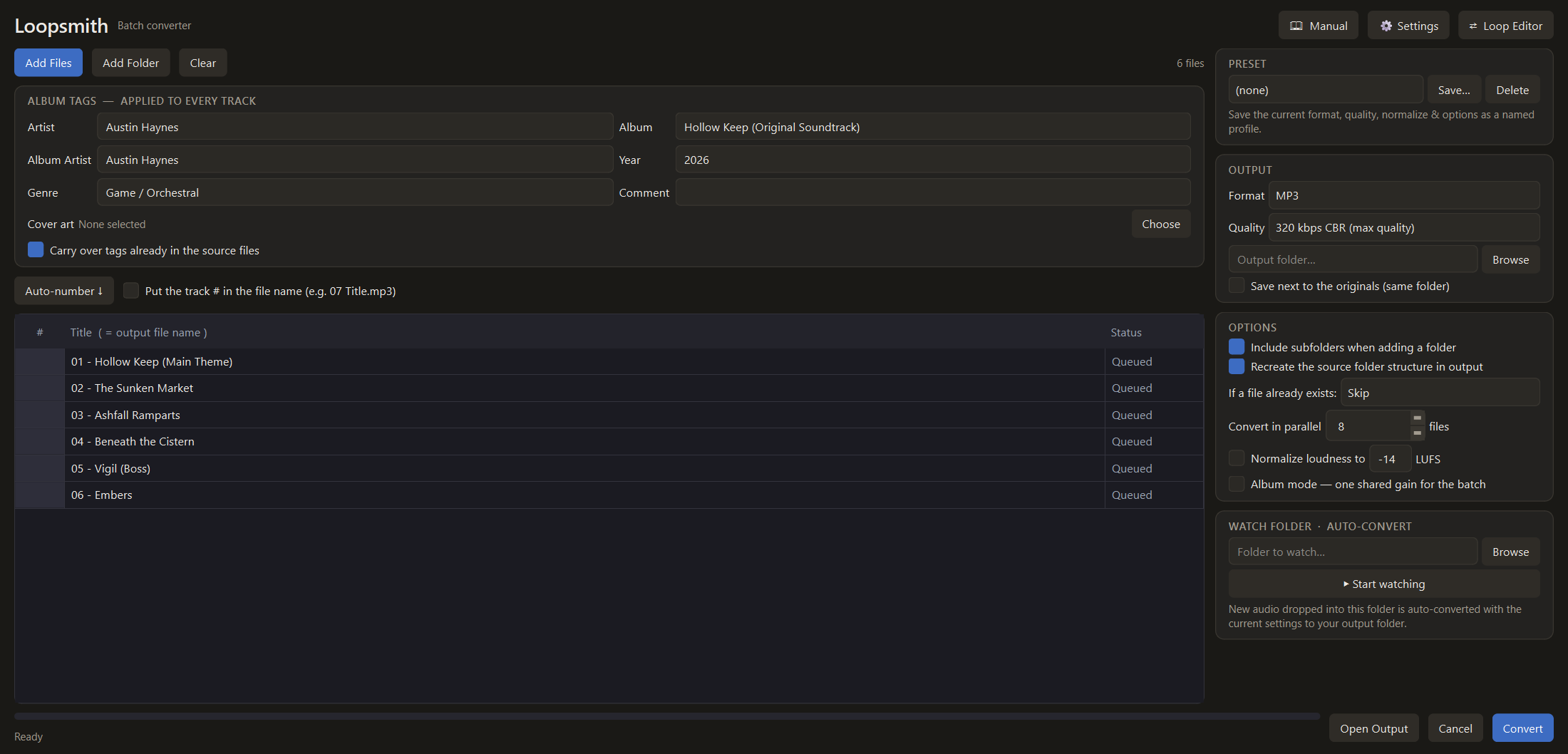
A full batch converter, too. Drag in a folder and convert to MP3, OGG, Opus, FLAC, ALAC, WAV, or AIFF at the quality you choose. You get album tags and embedded cover art (artwork in every format except AIFF, which gets text tags only), EBU R128 loudness normalization with album mode, parallel conversion, a watch folder, and a command-line tool.
Every purchase includes: the full app, a step-by-step manual (8 engines), royalty-free exports for any commercial project, all Loopsmith 1 updates, and email support. Not sure yet? Grab the free demo below and run it on your own track first.
- Windows 10/11, 64-bit. Installs per-user, no admin rights needed.
- Self-contained: the audio engine (FFmpeg) is built in.
- No account, no internet, no telemetry.
Made by Austin Haynes, a composer for games.
FMOD Studio is a trademark of Firelight Technologies Pty Ltd. Wwise is a trademark of Audiokinetic Inc. Loopsmith is an independent tool and is not affiliated with, endorsed by, or sponsored by either company.
Purchase
In order to download this tool you must purchase it at or above the minimum price of $36.75 USD. You will get access to the following files:
Download demo
Development log
- Loopsmith 1.8.0: Guided First Loop9 days ago
- Loopsmith 1.7.1: twenty-one bug fixes21 days ago
- Loopsmith 1.7.0: Unreal without middleware, and stingers everywhere27 days ago
- Loopsmith 1.6.0 - one click builds your FMOD event or Wwise music hierarchy35 days ago
- Building Adaptive Game Music From Synchronized Stems41 days ago
- Why Reverb Tails Break at Game Music Loop Points41 days ago
- Loopsmith 1.5.0: A bars-and-beats ruler, and a quieter editor42 days ago
- Loopsmith 1.4.0: Layers by name, and smarter loop detection47 days ago
Leave a comment
Log in with itch.io to leave a comment.